Recently while working with Config manager I needed to add some storage drivers to the boot file. I ended up getting this strange error message but not much info. I did some “RESEARCH”… thanks BING, and I was able to find a resolution. What I found there was a capability issue that needed to be resolved. Here is a great article that describes compatibility means in SQL. If you do the following SQL query on the SQL server the MECM DB Host.
SELECT name, compatibility_level FROM sys.databases;Once you run the command you will see the following results
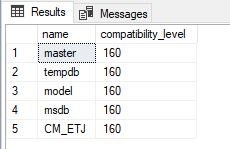
In my lab my setting was set to 150, I needed to change mine to 160. If you run the following SQL query it will change it to 160.
ALTER DATABASE database_name

SET COMPATIBILITY_LEVEL = 160;
Hope this helped you out.
 Ed_Tech_Jeff